How to Prompt?
Crafting effective prompts is key to creating compelling NFT collections on Dopamint
Prompt Structure
Use [text:fieldname] or [image:fieldname] placeholders in your base prompt. These become customizable fields that minters can fill in.
Quick ways to add fields:
- Type
/in the prompt editor to insert field format - Click "+ Add text trait" or "+ Add image trait" buttons for quick insertion
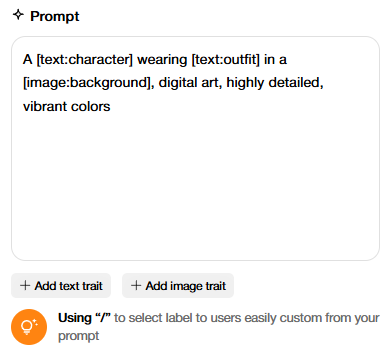
Example:
A [text:character] wearing [text:outfit] in a [image:background],
digital art, highly detailed, vibrant colors
This creates three customizable fields: character, outfit, and background. When published, the user interface will display these fields, allowing users to remix them according to your concept.
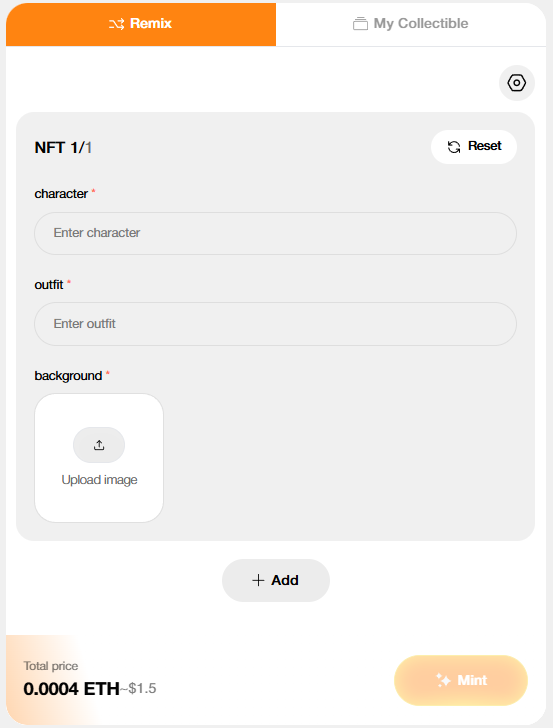
No Fields? AI Randomizes
If you don't add any customizable fields, the AI will generate random variations based on your base prompt. Each mint creates a unique NFT with randomized traits based on your prompt — perfect for surprise collections where every piece is different.
Best Practices
Be Specific
- Include style descriptors (digital art, oil painting, 3D render)
- Add quality keywords (highly detailed, 4K, professional)
- Define mood and atmosphere (vibrant, moody, ethereal)
- Include reference images to help guide the AI in style, composition, or specific details for inspiration.
Optimize for AI Models
- ChatGPT: Works well with detailed descriptions
- Nano Banana (Gemini): Fast generation speed, great for quick iterations and detailed artwork
- Grok: Excels at creative interpretations and unique artistic visions
- Each model has unique strengths — experiment to find your fit
Pro Tips
- Start with templates if you're new to prompting
- Specify how to use each image in your prompt, like: "Image 1 for pose, Image 2 for background," or "Blend colors from Label 1 with composition of Label 2."
- Preview your generation before publishing
- Study successful collections for inspiration
- Remember: prompts are immutable after publish